
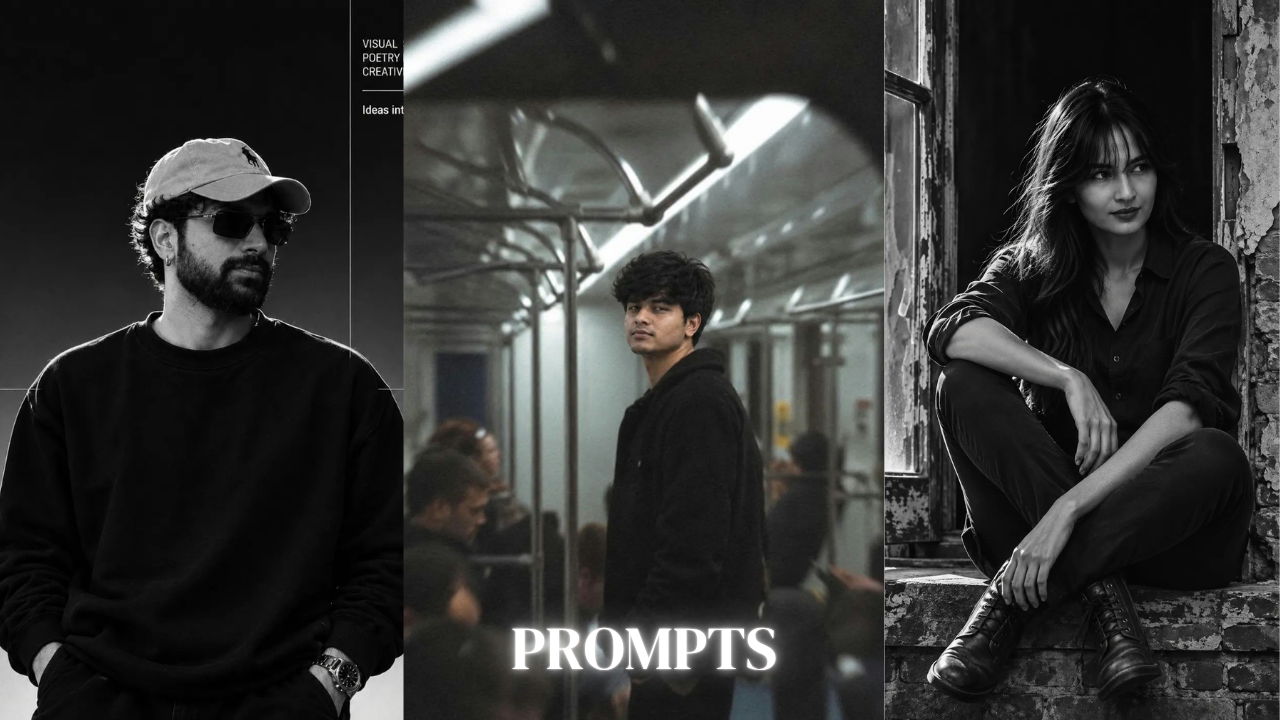
Top 100 Best Bokeh Effect Gemini Prompt | DSLR Photo Prompt for Gemini
Introduction to Best Bokeh Effect Gemini Prompt
Photography is not only about capturing a person’s face or outfit. The background, lighting, camera angle, and overall atmosphere also play an important role in making a photograph look beautiful. One photography style that many people love is the bokeh effect. It creates a soft, blurry background with beautiful circles of light while keeping the main subject sharp and clear. This effect is commonly seen in professional DSLR portraits, wedding photography, fashion shoots, and cinematic pictures.
Nowadays, you do not always need an expensive DSLR camera to experiment with this photography style. With Google Gemini and AI photo editing, you can explore different portrait ideas using simple text prompts. The Best bokeh effect gemini prompt can help you create attractive girl portraits, outdoor photographs, night photography, and professional-looking Instagram pictures.
Many people search for a DSLR photo prompt for Gemini because they want their normal photographs to look like professional camera shots. You can experiment with soft background blur, natural lighting, colourful bokeh, and realistic skin details. Whether you want a cute outdoor portrait, a traditional saree photograph, or a cinematic night picture, the right prompt can help you describe your idea properly.
In this article, we will explain the bokeh effect, discuss how it works in photography, and share useful tips for creating realistic AI portraits with Google Gemini. We will also explore different girl photography styles, background blur techniques, and ways to improve your final image.
What Is the Bokeh Effect in Photography?
Bokeh is a photography term used to describe the appearance of the out-of-focus areas in an image. It is especially noticeable when small background lights become soft, round, or colourful shapes. Instead of showing every background detail clearly, the photograph keeps the main subject in focus and makes the surroundings look smooth and blurry.
You may have seen this effect in wedding photographs where small decorative lights appear as beautiful golden circles behind the couple. It is also common in outdoor portraits, where sunlight passing through trees creates soft highlights in the background. These blurred areas add depth and make the subject stand out.
The bokeh effect is created through the combination of lens aperture, focal length, distance between the camera and subject, and distance between the subject and background. A wider aperture, such as f/1.8 or f/2.0, can help create a stronger background blur when the other conditions are suitable.
The quality of bokeh also depends on the camera lens. Some lenses produce smooth and creamy background blur, while others create more noticeable circular highlights. This is why professional portrait photographers often choose specific lenses for fashion, wedding, and close-up photography.
Why Best Bokeh Effect Gemini Prompt Is Trending
Many people love professional DSLR portraits because they have a clear subject and a beautiful blurred background. However, arranging a professional photoshoot can take time and money. AI image tools offer another way to experiment with this appearance by using a reference photograph and a detailed description.
Google Gemini allows users to explore different creative image ideas through text instructions and supported image-editing features. You can describe the type of background blur, lighting, outfit, pose, and camera style you want. This makes it easier to experiment with different photography concepts.
The Best bokeh effect gemini prompt is useful for people who want to create attractive profile pictures, Instagram posts, fashion portraits, and aesthetic photographs. You can try golden-hour bokeh, colourful night lights, garden backgrounds, wedding-style portraits, or soft studio photography.
Another reason for its popularity is that bokeh can work with different types of photography. Girls can experiment with traditional saree portraits, modern fashion looks, and natural outdoor pictures. Boys can try cinematic portraits, casual street photography, and professional profile pictures.

Create stunning portraits with the Best Bokeh Effect Gemini Prompt, featuring DSLR-style background blur, realistic lighting, and high-quality AI photo editing.
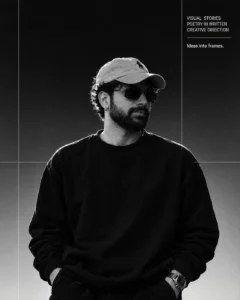
Create an ultra-realistic black-and-white cinematic portrait of me, preserving my original face, facial features, skin tone, and identity exactly as in the reference photo. I am wearing a light-coloured baseball cap, black rectangular sunglasses, a small hoop earring, a plain oversized black sweatshirt, and a stylish wristwatch. My hands are inside my pockets, standing confidently with my head slightly turned towards the right, looking away from the camera. Give me natural curly hair and a neatly trimmed full beard. Use dramatic studio lighting with strong highlights and deep shadows, a dark gradient background, and a minimalist editorial photography aesthetic. Add thin white grid lines and a clean magazine-style layout, with small typography in the upper-right corner reading “VISUAL STORIES – IDEAS INTO FRAMES.” High-contrast monochrome photography, sharp facial details, professional fashion editorial, vertical 4:5 composition, 4K quality.
Best Bokeh Effect Gemini Prompt for Girl Photography
Girl photography offers many creative possibilities because different outfits, hairstyles, backgrounds, and lighting styles can create different moods. A soft bokeh background can make a portrait look elegant without adding too many editing effects.
Imagine a young Indian woman standing in a beautiful garden during the evening. She is wearing a pastel pink dress, and her hair is styled naturally. The background contains small golden lights and soft green colours, while her face remains sharp and clearly visible. The overall photograph has a peaceful and dreamy appearance.
Another idea is a close-up portrait with natural sunlight falling gently on the face. The background contains blurred flowers and soft circular highlights. This type of image works well for Instagram profile pictures because it keeps attention on the subject.
When writing a girl photography prompt, describe the outfit, pose, facial expression, hairstyle, and lighting. You can also mention the type of bokeh you want, such as soft golden circles, colourful lights, or creamy natural background blur.
DSLR Photo Prompt for Gemini
Many users search for a DSLR photo prompt for Gemini because they want AI-generated pictures to have the appearance of professional camera photography. DSLR-style portraits usually focus on sharp subject details, natural skin texture, realistic lighting, and controlled background blur.
To create this look, describe the camera style and photographic composition. You can mention a portrait lens, shallow depth of field, soft natural light, and a blurred background. A 50mm or 85mm portrait lens style can be useful when describing the kind of framing you want.
For example, imagine a young woman wearing a beautiful white outfit while standing near a flower garden. Her face and eyes are in sharp focus, while the background has smooth green and golden bokeh. The photograph looks like a professional outdoor portrait captured with a DSLR camera.
Remember that writing DSLR, 50mm, or 85mm in a prompt does not guarantee that the image will reproduce the exact behaviour of a real camera. These terms help communicate the visual style, but the final result depends on the AI image tool.
Background Blur Prompt Gemini for Professional Portraits
Background blur is one of the most important parts of portrait photography. It helps separate the subject from the surroundings and creates a feeling of depth. When the background is less distracting, viewers can focus more clearly on the person’s face, outfit, and expression.
For an outdoor portrait, you can describe a garden filled with green trees and colourful flowers. The subject stands a short distance in front of the background, while the camera focuses sharply on the face. The trees and flowers become softly blurred, creating a natural photographic appearance.
For a studio portrait, you can choose a plain grey or beige background with subtle blur. This style is useful for professional headshots, fashion portraits, and profile pictures.
When using a background blur prompt Gemini style, explain which parts should remain sharp and which parts should be out of focus. The face, eyes, and important outfit details should remain clear, while distant background objects can have a softer appearance.
Golden Hour Bokeh Photography
Golden hour is the period shortly after sunrise or before sunset when sunlight becomes softer and warmer. This lighting is popular among photographers because it creates beautiful highlights and gentle shadows. When combined with bokeh, it can produce dreamy outdoor portraits.
Imagine a girl standing in a garden during sunset. Warm sunlight passes through the trees, creating small golden circles in the background. Her face is illuminated with soft natural light, and her hair has a gentle golden highlight. The background remains blurred while the subject looks clear and natural.
This style works well with casual outfits, traditional dresses, and modern fashion photography. You can also try a portrait near a beach, park, or countryside location.
For a better result, mention warm sunlight, natural skin tones, soft shadows, and golden background highlights. Avoid asking for too much glow because it can make the photograph look artificial.
Night Bokeh Prompt Gemini for Stylish Photography
Night photography creates a different atmosphere compared to daylight portraits. City lights, decorative bulbs, streetlights, and illuminated buildings can become colourful bokeh when they are out of focus. This makes night portraits look cinematic and modern.
Imagine a young woman standing on a city street at night, wearing a stylish black outfit. Behind her, colourful lights from shops and vehicles create soft red, blue, yellow, and golden circles. Her face is illuminated by gentle light, while the background remains dark and beautifully blurred.
You can also try a portrait near a café with warm decorative lights. The subject can be sitting beside a window while the background contains soft golden bokeh. This style creates a cosy and aesthetic appearance.
When creating a night prompt Gemini image, explain how the face should be illuminated. A dark background should not make the subject completely black. Ask for balanced exposure, realistic shadows, and visible facial details.
Gemini 8K Photo Prompt for High-Quality Portraits
Many users include terms such as 4K or 8K in their prompts because they want detailed and sharp images. A Gemini 8K photo prompt can describe the preference for clear facial details, realistic hair, detailed clothing, and high-quality image rendering.
However, using the words 8K or ultra-HD does not automatically guarantee a genuine 8K output. The actual resolution depends on the image tool and its available settings. It is better to combine quality-related words with clear descriptions of the details you want.
For example, you can ask for a high-detail portrait with natural skin texture, sharp eyes, realistic hair strands, detailed fabric, balanced lighting, and a smooth bokeh background. These instructions describe the visual qualities more clearly than simply repeating the word 8K.
If you are creating a portrait for Instagram, make sure the image is also composed properly. A sharp face and balanced background can be more important than adding many quality-related keywords.
Image Enhancer Prompt Gemini for Better Photo Quality
Sometimes an original photograph may look slightly dull, blurry, or poorly exposed. An image enhancer prompt Gemini can help you describe the improvements you want when using a supported image-editing feature.
For example, you can ask Gemini to improve the brightness, balance the colours, sharpen important facial details, and reduce unnecessary noise while keeping the original appearance natural. You can also request better background separation and more realistic lighting.
The important thing is to avoid changing everything in the original photograph if you only want quality improvement. If your goal is to enhance the existing image, mention that the person’s face, outfit, pose, and composition should remain unchanged.
You can also ask for realistic skin texture instead of heavy smoothing. This helps avoid the plastic-like appearance that sometimes appears in AI-edited portraits.
Best Bokeh Effect Gemini Prompt for Saree Photography
Traditional saree photography looks especially beautiful when combined with a soft background blur. The colours, fabric details, jewellery, and natural expressions can become the main focus of the photograph.
Imagine an Indian woman wearing a beautiful red saree with a golden border. She is standing near a decorated garden with small warm lights in the background. The camera focuses on her face and saree, while the surrounding flowers and lights become soft golden bokeh.
You can also experiment with white sarees, pastel pink sarees, green silk sarees, and black sarees. A white saree with natural sunlight can create a soft and elegant appearance, while a dark saree with warm evening lights can produce a more dramatic portrait.
When writing your prompt, describe the saree fabric, border, blouse design, jewellery, hairstyle, and pose. Ask for realistic fabric texture and natural lighting so that the outfit does not look artificial.
Bokeh Effect for Outdoor Girl Photography
Outdoor locations offer many opportunities for creating beautiful bokeh backgrounds. Gardens, parks, beaches, mountain roads, and flower fields can all work well for portrait photography. Natural light also helps the photograph feel more realistic.
A garden portrait can use green leaves and sunlight to create soft circular highlights. A beach portrait can use sunlight reflecting from the water, while a mountain portrait can have a softly blurred natural background. Each location creates a different mood.
For a flower-field photograph, imagine a girl wearing a light-coloured dress while standing among colourful flowers. The face remains in sharp focus, and the flowers behind her become soft and dreamy. This creates a beautiful composition without needing excessive editing effects.
The key is to describe the distance between the subject and background. A greater separation can help create a stronger sense of depth in traditional photography. In AI editing, this instruction can also help communicate the visual result you want.
Best Bokeh Effect Gemini Prompt for Boy Photography
Bokeh photography is not only for girls. Boys can also use this style for stylish portraits, fashion photography, and Instagram profile pictures. A dark jacket, casual shirt, or traditional outfit can look attractive with a soft blurred background.
Imagine a young man wearing a black shirt while standing on a city street during the evening. Warm streetlights appear as golden circles behind him, and the face remains sharp. The lighting is cinematic, with natural shadows and realistic skin texture.
For a more natural style, you can create a garden portrait with green background blur and soft morning sunlight. For a dramatic look, choose a dark background with subtle blue or golden lights.
The Gemini AI photo prompt trending boy 2026 style can include DSLR-inspired portrait photography, shallow depth of field, realistic facial details, and cinematic colour grading. Keep the instructions simple so the main subject remains the focus.
How to Create the Best Bokeh Effect Gemini Prompt
Start by deciding what type of photograph you want. Choose whether you need a close-up portrait, half-body photograph, or full-body composition. This will help determine how much of the background should be visible.
Next, select the background and lighting style. You might prefer golden-hour sunlight, a flower garden, a city street at night, a decorated indoor setting, or a professional studio. Explain the colours and mood you want the background to have.
Then describe the bokeh effect. You can request soft circular lights, creamy background blur, natural depth of field, or colourful out-of-focus highlights. Mention that the subject’s face and eyes should remain sharp.
Finally, explain the outfit, pose, and image quality. If you are editing your own photograph, request that the original facial features and natural skin tone should remain consistent. A clear and organised prompt is easier to understand than a long description filled with unrelated effects.
How ChatGPT Helps You Write Better Gemini Photo Prompts
ChatGPT can help you turn a simple photography idea into a detailed prompt. You can explain what kind of portrait you want and ask ChatGPT to describe the lighting, background, outfit, pose, and camera style.
For example, you might say that you want a realistic portrait of a girl wearing a pastel dress in a flower garden with a blurred golden background. ChatGPT can organise this idea into a detailed description that includes soft sunlight, natural skin texture, sharp eyes, and shallow depth of field.
You can also request different versions of the same concept. One version can use golden-hour bokeh, another can use night-time city lights, and another can focus on traditional saree photography. This makes it easier to experiment with different styles.
If the first result is not suitable, explain what needs improvement. You can ask for a stronger background blur, softer light, more natural skin texture, or a different camera angle. Small changes often make the prompt more useful.
Common Mistakes to Avoid in Bokeh Photography
One common mistake is making the background too blurry. If the blur is too strong, the image may look artificial and the environment may lose its natural appearance. Ask for a balanced depth of field that keeps the subject sharp while allowing some background details to remain visible.
Another mistake is using too many colourful lights. Golden, blue, red, and purple bokeh can look attractive, but combining too many colours may make the image crowded. Choose a colour combination that matches the outfit and mood.
Poor lighting on the face is another issue. Even if the background looks beautiful, the photograph will not be attractive if the face is too dark. Make sure the subject has enough soft light and natural skin tones.
Finally, do not depend only on words such as DSLR, 8K, or ultra-realistic. Describe the actual details you want, including sharp eyes, realistic hair, natural shadows, and balanced colours. These instructions help communicate your expectations more clearly.
Top 100 Best Bokeh Effect Gemini Prompt: Explore Different Styles
The idea behind Top 100 Best Bokeh Effect Gemini Prompt is to explore a variety of photography concepts rather than using the same blurred background for every image. You can experiment with golden-hour portraits, colourful night bokeh, garden photography, flower-field portraits, wedding-style images, and professional studio photographs.
You can also change the outfit, pose, camera framing, and background colour. A pastel dress with soft golden bokeh can create a dreamy portrait, while a black outfit with blue night lights can produce a cinematic appearance. Traditional saree photography can use warm golden highlights, while modern fashion portraits may suit a clean studio background.
Boys can explore street photography, casual outdoor portraits, and dark cinematic images. Girls can experiment with traditional outfits, aesthetic portraits, modern fashion, and natural outdoor photography. Each style can be customised by changing the lighting and background.
Instead of repeating the same prompt with only a different outfit, try changing the photographic environment and mood. This will help you create a more interesting collection of AI portraits.
Conclusion
The Best bokeh effect gemini prompt is a useful way to explore DSLR-inspired portrait photography with Google Gemini. From beautiful girl portraits and traditional saree photography to outdoor pictures and colourful night scenes, the bokeh effect can give your images a soft and professional appearance.
For better results, use a clear reference photograph, describe the background blur properly, and keep the subject’s face sharp. Pay attention to lighting, outfit details, natural skin texture, and composition. Do not add unnecessary effects that make the image look artificial.
Whether you want a Gemini 8K photo prompt, a background blur prompt Gemini style, or a night prompt Gemini portrait, focus on describing the image you actually want. Experiment with different ideas, make small improvements, and enjoy creating your own photography style with AI.
